Docs
Getting Started with milkbridge
Connect Remember The Milk to your AI agents with clear ownership, safe guardrails, and predictable workflows.
1. Create your milkbridge account
Sign in, then open your dashboard to connect Remember The Milk and generate an API key.
Go to login2. Connect Remember The Milk
Use the RTM connect flow in your dashboard and approve app access in RTM.
3. Create an API key and configure your agent
Use the dashboard config block to connect Claude Desktop, Cursor, or any compatible MCP client.
Full disconnect (important)
Disconnecting in milkbridge removes your token from milkbridge only. To fully revoke access, you must also revoke the app in RTM settings.
- Disconnect in the milkbridge dashboard.
- Open RTM Apps settings: https://www.rememberthemilk.com/app/#settings/apps
- Find milkbridge in the app list and click Revoke access.
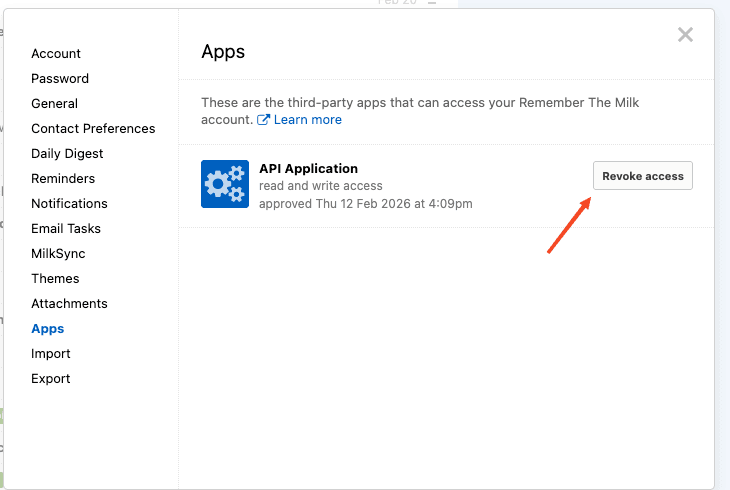
In RTM settings, open Apps and click Revoke access to complete disconnection.